Payments
4 apps liveTake money on PayBito's payments rails — as a merchant with a storefront, as a third-party app reading a merchant's data under OAuth, or as the operator of the whole platform.
How it was builtThe PayBito MCP prompts that generated this app — click to view7 steps▶
This storefront wasn't hand-specced — the PayBito MCP drove a short, one-question-at-a-time intake in Claude Code, locked in exactly what to build, then wrote it. Here's that real run:
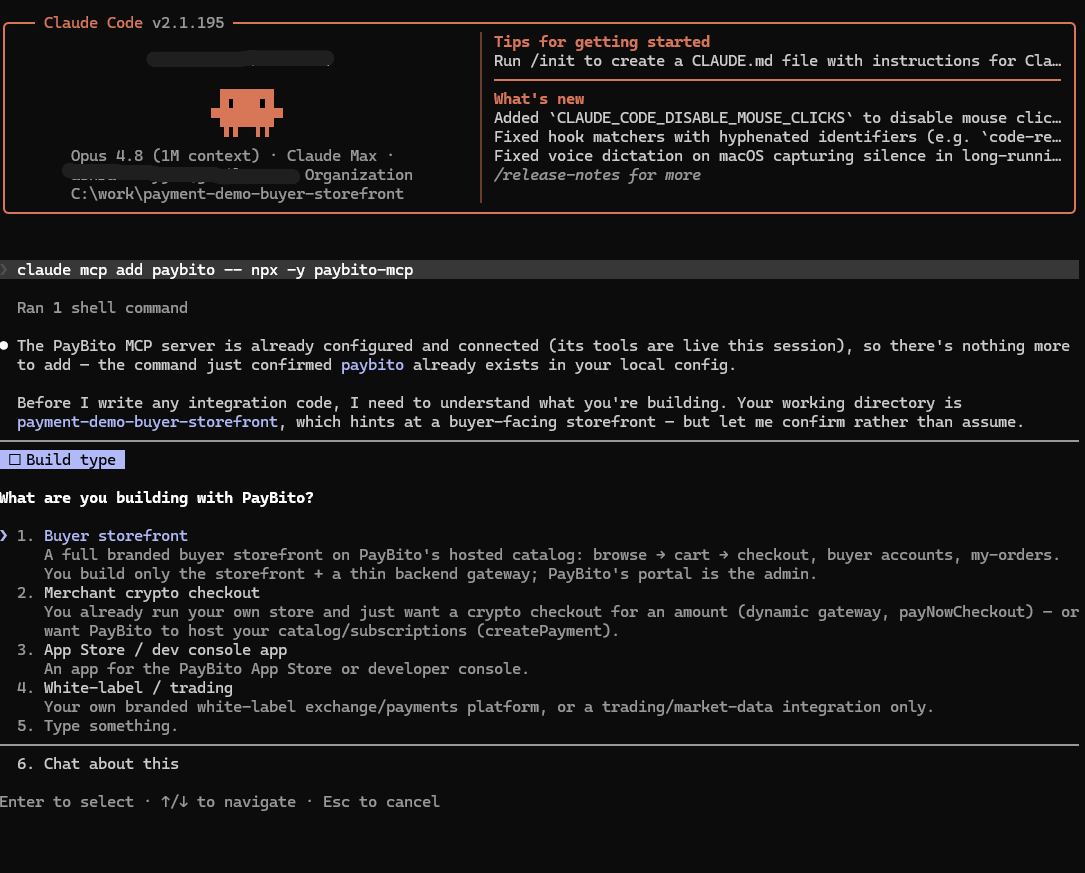
01 Connect with claude mcp add paybito -- npx -y paybito-mcp, say “use paybito”, and pick Buyer storefront from the top-level menu.
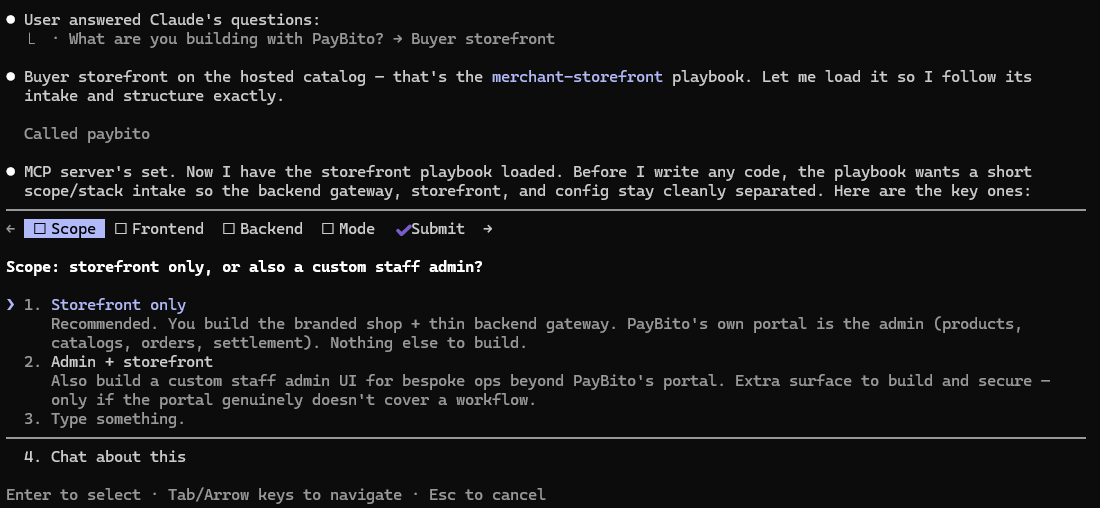
02 Scope: storefront only (PayBito's portal is the admin) — no admin to build.
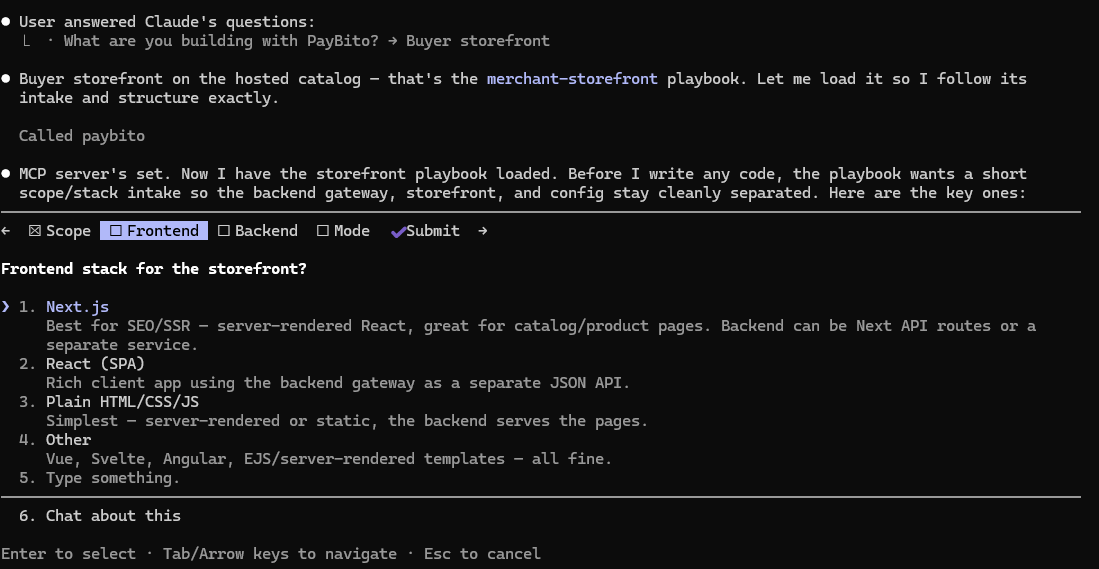
03 Frontend stack — Next.js (best for SEO/SSR); the key stays on the backend, never the browser.
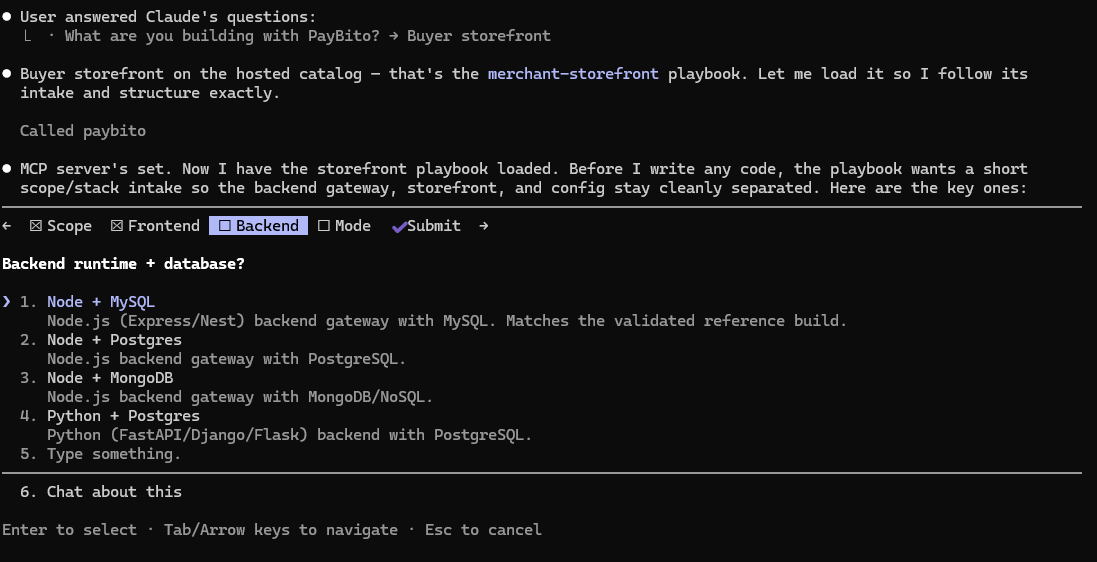
04 Backend + database — Node (Express/Nest) + MySQL: holds the key, buyer accounts, orders (by PCN), cart, webhook log.
05 Test or Live — account-dependent sandbox; keys kept in separate env vars.
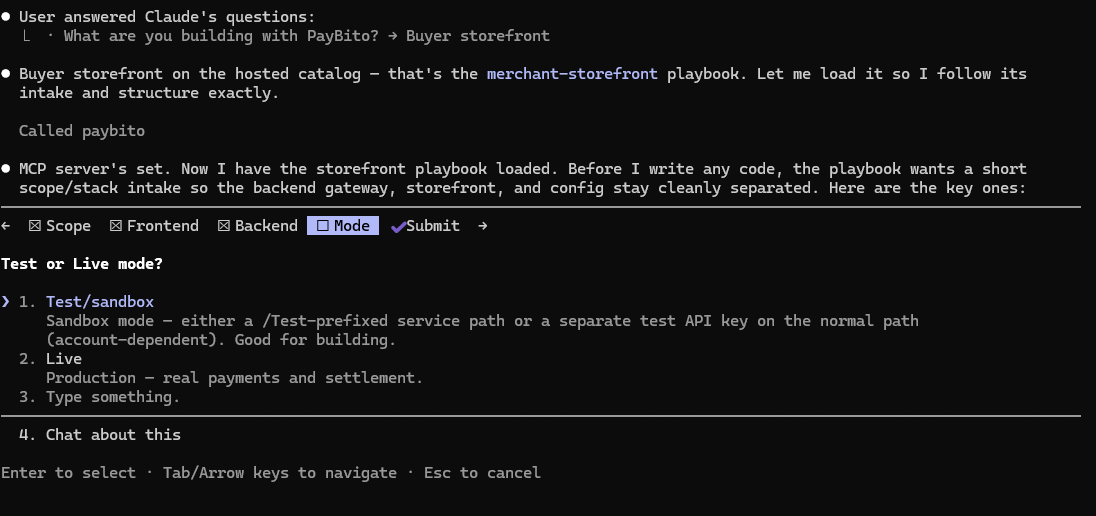
06 Domain — PayBito (service.hashcashconsultants.com / portal.paybito.com) or a custom broker domain (checkout at your-domain/payments). You give the bare domain; the MCP appends the fixed paths.
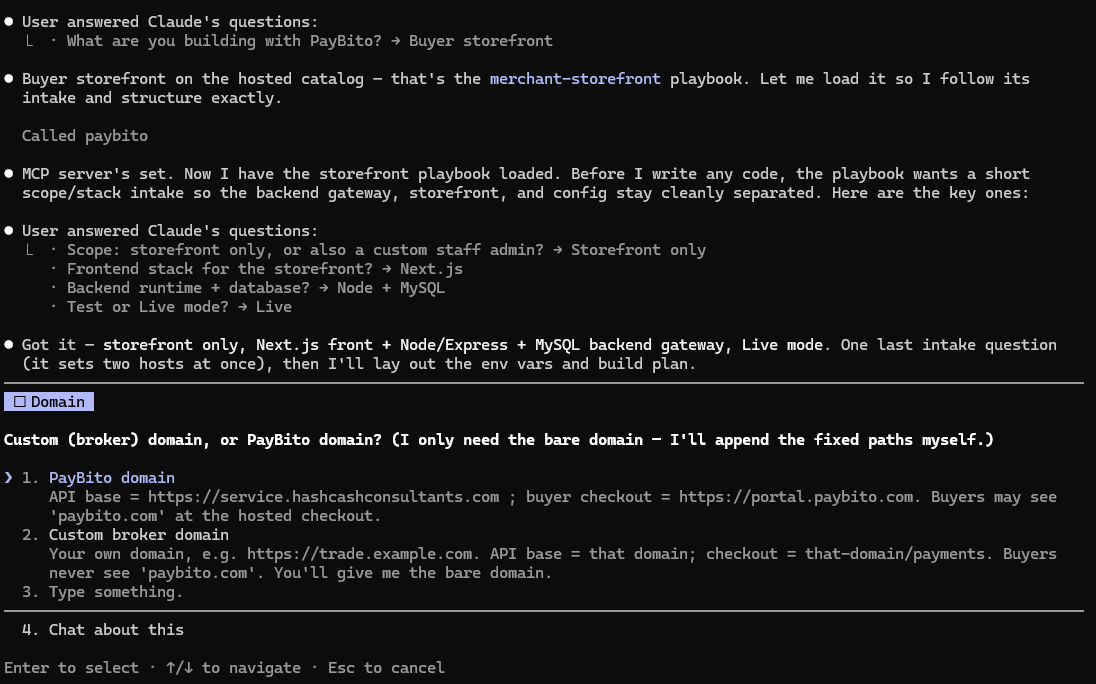
07 Perfect knowledge locked in — the MCP recaps every answer, pulls the exact PayBito operation specs, and builds the storefront + thin backend gateway, one module at a time.
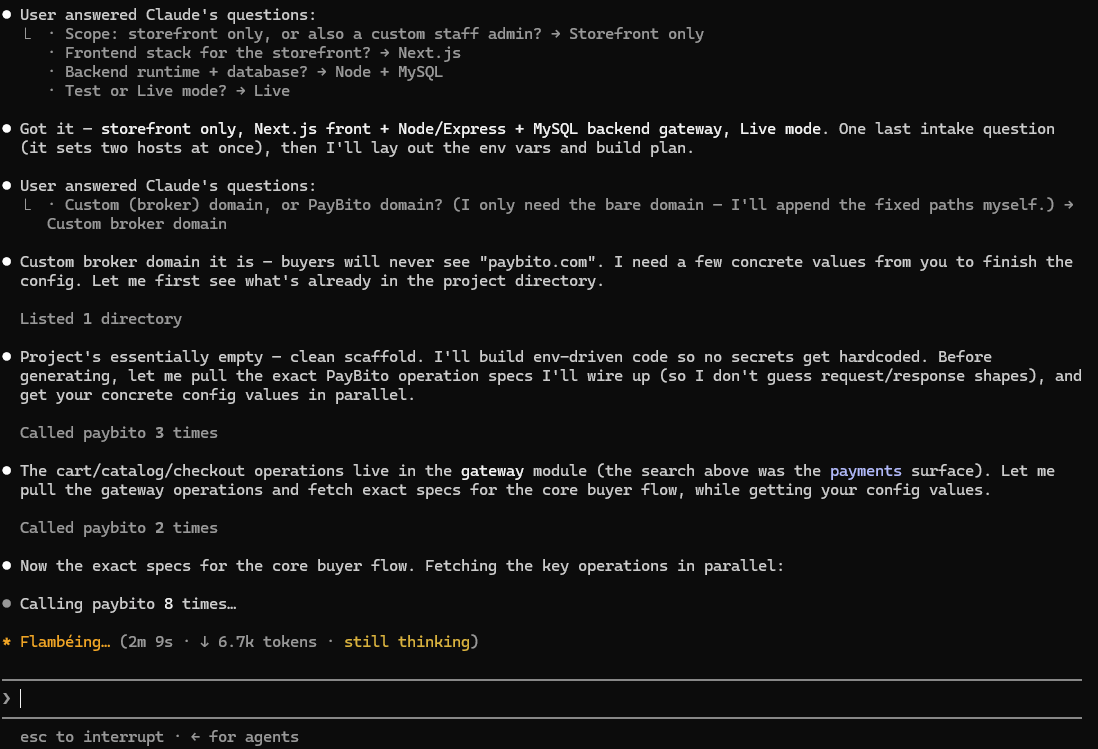
How it was builtThe PayBito MCP intake that produced this app — click to view5 steps▶
An App-Store app is a different animal from the storefront — it doesn't own a platform, it consumes one on a merchant's behalf. The MCP routes to that answer with a single question, then hands over the exact capability map for the tile you picked.
01 The routing question. Connect with claude mcp add paybito -- npx -y paybito-mcp, say “use paybito”, and answer the one question that decides everything: what are you building? Not a merchant, not a broker — an App-Store developer, consuming a platform's data via OAuth scopes.
02 Which tile? Payments Platform — which routes to the payments-platform-app playbook. That single answer fixes the base host (service.hashcashconsultants.com), the consent screen (portal.paybito.com/payments/authorize), and the auth realm.
03 The capability map. The MCP lays out all 50 read operations grouped by the 8 scopes that unlock them — then insists on the minimum. This app needs payments.product.read for the catalog and payments.report.read for the sales overlay. Nothing else is requested, because installers see and consent to every scope you ask for.
04 The auth realm — and the trap. Every data call on the payments tile needs three headers: Authorization: Bearer, X-CLIENT-ID, and uuid. That third one is unique to payments (launch and exchange send only two), it is returned only by the token call, and without it a perfectly valid, correctly-scoped token is denied with a bare 403. The MCP names it up front.
05 Exact specs, then build. paybito_get_operation returns the real request/response shape for each op — getAllCatalogs, getProductDetails, getMerchantTopProducts — including each report's nested row shape, and the app is written against those, one screen at a time.
How it was builtThe PayBito MCP intake that produced this app — click to view5 steps▶
Same tile, same auth, a completely different app — which is the point of the capability map. The MCP's operation specs are also what kept this one honest: they say what an endpoint returns, and where they stop, the app has to go and look.
01 Role, then tile. App-Store developer → Payments Platform, exactly as above. The plumbing — the OAuth handshake, the two-part state, the Redis-backed session — carries straight over from the previous app, because the auth realm is identical.
02 Two scopes, and one refused. payments.transaction.read is the engine. payments.refund.read flags buyers who keep sending things back. The MCP's own scope table showed that payments.profile.read returns the merchant's buyer-info collection profiles — which checkout fields they ask for — and not actual buyers. So it wasn't requested. Reading the map stopped us asking a merchant to consent to something useless.
03 The engine. paybito_get_operation("post_transactions_byFilter") gives the paginated ledger call, its filters, and the flattened transaction row. Every page is walked server-side and folded into people — which is all RFM really is.
04 The traps, named up front. Three things would otherwise have shipped as plausible, wrong pages: customerIdentity is a KYC status (the literal string "VERIFIED"), not a person; the date is paymentCreatedAt, not createdAt; and paidAmount is 0 on anything that didn't settle. Every one of them is now in the op's own notes — this app is why.
05 Read-only, and provably so. All 50 operations on this surface are reads — the playbook is explicit that if a design needs a write, it is not on this surface and you must not invent one. Buyer Lens cannot move money, refund an order, or edit a customer.
How it was builtThe PayBito MCP intake that produced this platform — click to view5 steps▶
Platform Operator build white-labeled to your own domain. The PayBito MCP guided the setup across all 7 merchant-admin modules (~99 operations).
01 Role, then tile. Platform Operator → Payments Platform. Configures white-label domain (payment-whitelabel-hc.paybito.com) with PayBito payments infrastructure underneath.
02 Auth realm & security. Uses dual-header authentication (X-MBX-APIKEY + X-MBX-SECRETKEY), origin checking, and backend IP whitelisting for admin endpoints.
03 Merchant & Catalog Management. Wires merchant onboarding, PCN generation, product catalog management, and fee structure configuration.
04 Hosted Checkout & Settlements. Integrates dynamic checkout pages, multi-crypto deposit addresses, webhook settlement updates, and merchant payout ledgers.
05 Exact specs, then build. Generated using exact paybito_get_operation schemas covering merchant admin, storefront, and settlement reporting modules.
Exchange & Financial Services
4 apps liveThe trader surface: spot, futures, options, margin, earn, loans and portfolio. A different host and a different auth realm from Payments — which is the single most common thing to get wrong when carrying code across.
How it was builtThe PayBito MCP intake that produced this app — click to view5 steps▶
This one doesn't touch the App Store or a white-label domain — it's the raw Exchange & ICO API, authenticated with an API key and a secret. That single fact changes the auth realm, and the MCP scopes to it from the first answer:
01 Area, not build type. Connect with claude mcp add paybito -- npx -y paybito-mcp, say “use paybito”, and instead of building an App-Store app or a platform, pick the Exchange & ICO trading / market-data path — a direct API integration keyed to your own account.
02 The auth realm — API key + secret. Your API key identifies the account and your secret authenticates each data request. There's no OAuth consent screen and no Bearer/X-CLIENT-ID pair — a different realm from the App-Store exchange apps, and the MCP keeps the two from being confused.
03 Two audiences, one credential. The same key set serves traders (market data, balances, order management) and ICO contract owners (contract tooling). The MCP maps which operations belong to which, so you request only what your app touches.
04 Live specs. paybito_search(query, module="exchange") plus the live /api-documentation/ reference pin the exact market-data, order and ICO endpoints — no guessing at paths or params.
05 Exact specs, then build. paybito_get_operation returns the real request/response shape for each op, and the app is written against those — the secret stays server-side, so the browser never holds a signing credential.
How it was builtThe PayBito MCP intake that produced this app — click to view5 steps▶
Same role as the two payments apps — App-Store developer — but a different tile, and that one answer changes the host, the headers and the identifiers. This is exactly what the MCP exists to stop you guessing at:
01 Role, then tile. App-Store developer → Exchange Platform (trader surface). The base host is fixed at accounts.paybito.com/TraderApi. The /api/… form you'll see in the spec is the white-label deployment — the MCP is explicit that an App-Store app never uses it.
02 A different auth realm — and this one has no uuid header. Realm oauth-appstore: data calls send two headers plus Origin — Authorization: Bearer and X-CLIENT-ID. Carrying the payments habit over here is the mistake; the MCP flags the split.
03 Where the uuid actually lives. It travels in the request body of per-user ops — and it is the principalId from the token response: same value, two names. There is no way to look it up afterwards, so it's persisted at token time. Two more identifiers the balance ops need (userId, customerId) come from GetUserDetails, captured once at connect.
04 The scope map shapes the app. "Everything you own" is the most scope-hungry app on this surface — up to ten trader.*.read scopes. Rather than demand all ten, the map became the architecture: every product is an independent panel, and the net-worth number is always "the sum of what we could actually read," labelled with exactly what that includes.
05 Exact specs, then build. paybito_get_operation per balance op, then Next.js 14 + TypeScript with Redis-backed sessions so tokens never reach the browser. Read-only throughout: Net Tally cannot place an order, transfer, or withdraw.
How it was builtThe PayBito MCP intake that produced this app — click to view5 steps▶
App-Store developer tile on the Exchange platform. The MCP's capability map identified the exact report endpoints and scopes required for tax computation without needing write access.
01 Role, then tile. App-Store developer → Exchange Platform (trader surface). Base host fixed at accounts.paybito.com/TraderApi.
02 Scope selection. Requests exact read scopes trader.user.read, trader.transaction.read, and trader.report.read to fetch user details, realised gains, GST, and TDS ledgers. No write or order scopes requested.
03 Product-wise isolation. Spot, futures, and options sections load independently. Missing scopes or untraded products hide cleanly without breaking the report layout.
04 Server-side token security. Access tokens stay strictly on the backend. The browser holds only an encrypted session cookie, and disconnecting purges cached reports and tokens.
05 Exact specs, then build. Uses paybito_get_operation for tax and ledger endpoints, generating Next.js + TypeScript tax summary components.
How it was builtThe PayBito MCP intake that produced this platform — click to view5 steps▶
Platform Operator build white-labeled to your own domain. The PayBito MCP guided the setup across exchange administrative, matching engine, and wallet management APIs.
01 Role, then tile. Platform Operator → Exchange Platform. Configures white-label domain (exchange-whitelabel-hc.paybito.com) with PayBito exchange core underneath.
02 Auth realm & security. Uses Bearer token authentication via admin authentication endpoints, enforcing server-side session management and IP restriction.
03 Market & Liquidity Setup. Configures trading pairs, order book precision, maker/taker fee tiers, and risk management limits.
04 Wallet & Settlement Engine. Connects hot/cold wallet custody, deposit address generation, transaction ledgers, and automated withdrawal approvals.
05 Exact specs, then build. Built against exact paybito_get_operation schemas covering exchange administration, order routing, and asset management.
Launch Platform
1 app liveThe broker surface — 180 operations under the fixed /BrokerApi base. The cleanest of the three App-Store tiles: one realm, no dual-realm complication.
How it was builtThe PayBito MCP intake that produced this app — click to view5 steps▶
App-Store developer tile on the Launch (Broker) platform. Uses the launch-platform-app playbook over the 180 /BrokerApi endpoints.
01 Role, then tile. App-Store developer → Launch Platform (broker surface). Base host fixed at institutional-bo.paybito.com:8443/BrokerApi.
02 Auth realm & headers. Realm oauth-appstore: data calls send Authorization: Bearer and X-CLIENT-ID. Clean single-realm architecture.
03 Scope minimisation. Requests exact read scopes broker.transaction.read and broker.exchange.read. Read-only by design — cannot modify broker settings or initiate transfers.
04 Metrics aggregation. Monthly volume, commission, active trader counts, and treasury status are calculated server-side and compared with previous month periods.
05 Exact specs, then build. Built using Next.js 14 & TypeScript based on exact paybito_get_operation schemas for broker analytics.
BitoCircle
2 apps liveBuild on BitoCircle — the social + creator-commerce platform (Bitohub feeds, posts, reels, messaging; Monetize shops, subscriptions, payouts). The same endpoints are reachable three ways: with an API key & secret, as a developer-portal app under OAuth scopes, or as a fully white-labeled community on your own domain.