Buyer Profiles
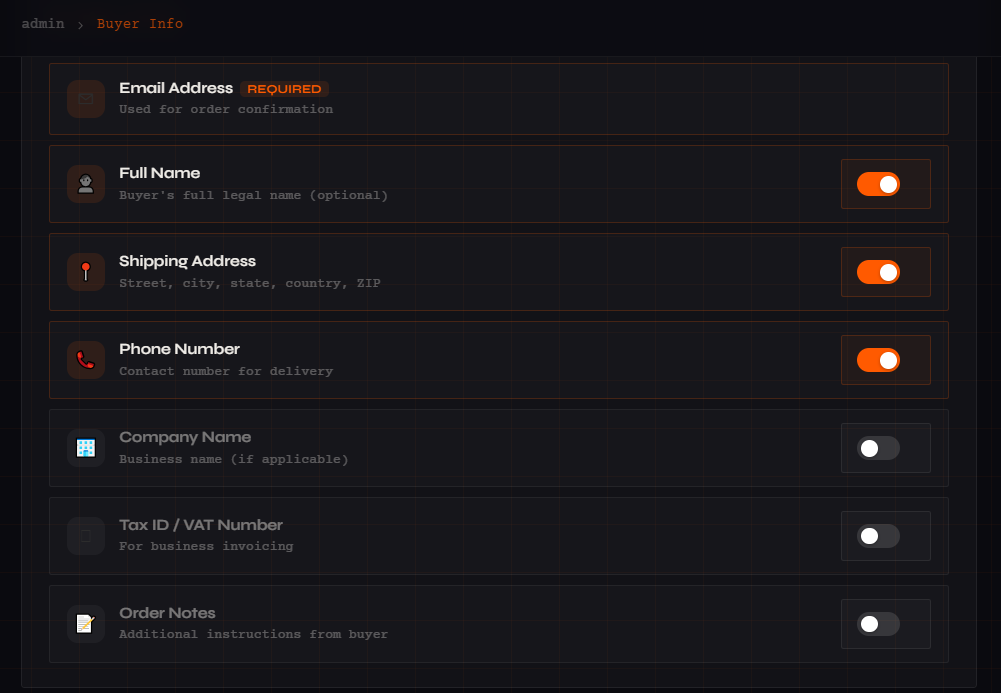
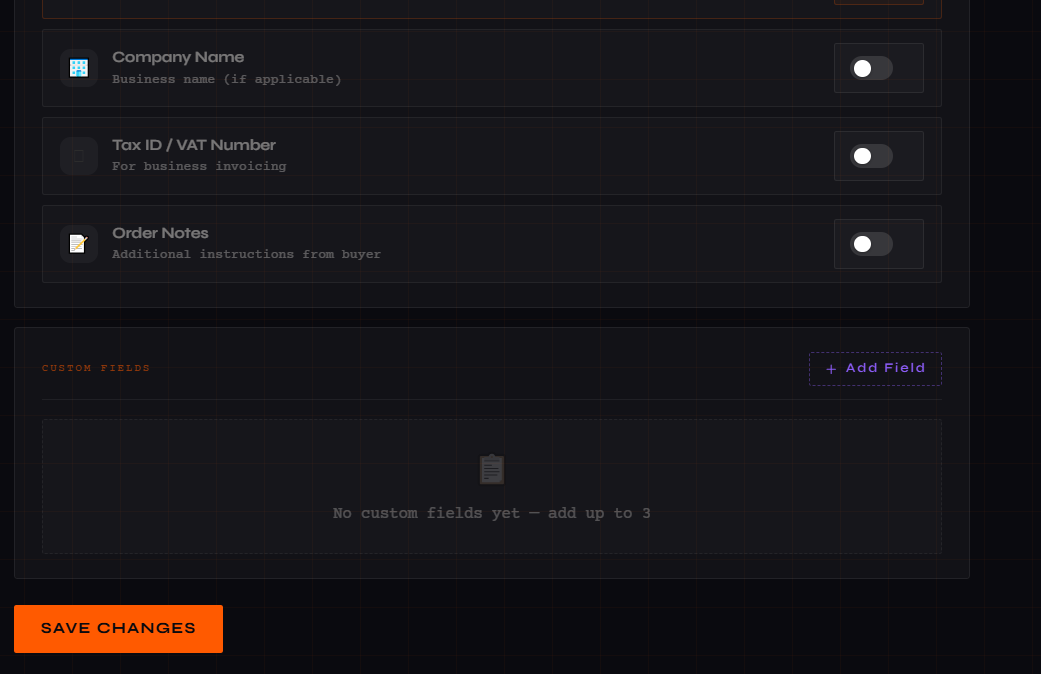
Buyer profiles define what information is collected from customers at checkout. You can control which fields appear, make certain fields mandatory, and add custom fields for specialized needs such as VAT invoicing or company registration.
Endpoints
Returns an array of all configured buyer profile objects associated with your merchant account.
200 OK – Array of profile objects
All boolean fields use 1 (enabled) or 0 (disabled). Custom fields let you add any extra data point needed for your checkout flow.
Request Body
JSON
{
                    "profileName": "Standard Checkout Form",
                    "collectEmail": 1,
                    "collectFullName": 0,
                    "collectAddress": 1,
                    "collectPhoneNumber": 0,
                    "collectCompanyName": 0,
                    "collectTaxInfo": 0,
                    "collectOrderNotes": 1,
                    "collectCryptoRefundAddress": 0,
                    "isDefaultProfile": 1,
                    "customFields": [
                    {
                    "customFieldId": 1,
                    "fieldLabel": "Company Registration No.",
                    "fieldType": "text",
                    "placeholderText": "Enter your reg number",
                    "helpText": "Required for VAT invoices"
                    }
                    ]
                    }
201 Created
| Path Param |
Type |
Description |
| id |
string |
Profile ID to update |
Request body is the same structure as the create endpoint.
Field Reference
| Field |
Type |
Description |
| profileName |
string |
Display name for this profile |
| collectEmail |
0/1 |
Collect email at checkout |
| collectFullName |
0/1 |
Collect customer full name |
| collectAddress |
0/1 |
Collect shipping address |
| collectPhoneNumber |
0/1 |
Collect phone number |
| collectCompanyName |
0/1 |
Collect company name |
| collectTaxInfo |
0/1 |
Collect VAT / tax information |
| collectOrderNotes |
0/1 |
Allow order notes at checkout |
| collectCryptoRefundAddress |
0/1 |
Collect crypto refund wallet |
| isDefaultProfile |
0/1 |
Set as the active default profile |
| customFields |
array |
Additional custom checkout fields |
Discount Management
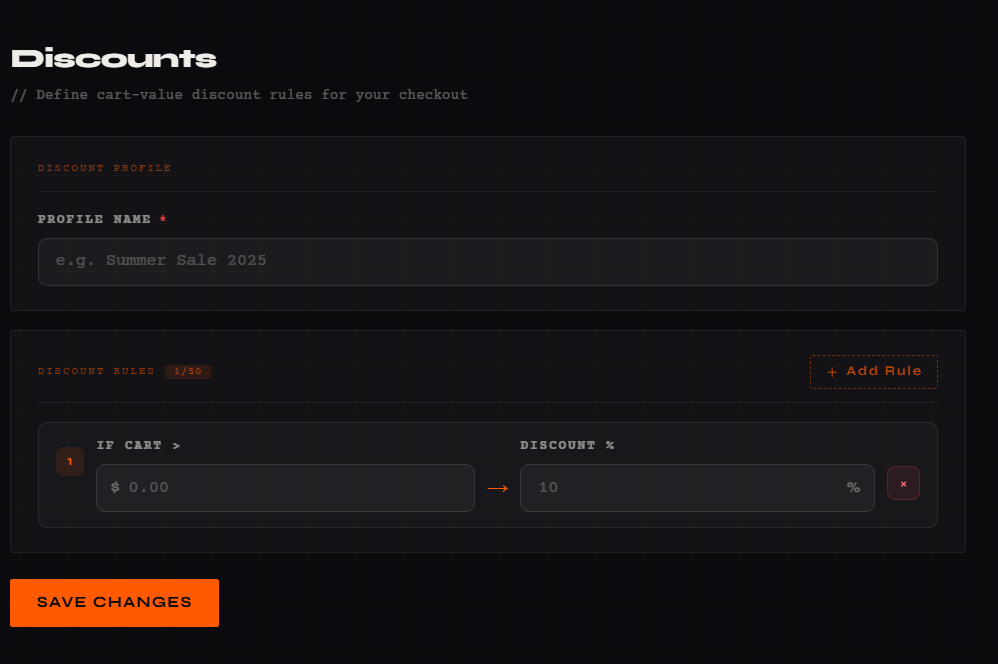
Create tiered discount rules based on cart value thresholds. Batch operations allow you to create and update multiple rules in a single API call, making it easy to configure promotional campaigns at scale.
Endpoints
| Query Param |
Type |
Description |
| merchantId |
string |
Your merchant ID |
Response
JSON
{
                    "status": true,
                    "data": [
                    {
                    "id": 1,
                    "profileName": "Summer Sale",
                    "minimumCartValue": 100.00,
                    "discountPercentage": 10.00
                    }
                    ]
                    }
Use updates to modify existing rules by ID, and newDiscounts to add new tiers in the same request.
JSON
{
                    "merchantId": 1001,
                    "profileName": "Summer Sale 2026",
                    "isDefaultProfile": 1,
                    "updates": [
                    {
                    "id": 42,
                    "minimumCartValue": 100.00,
                    "discountPercentage": 10.00
                    }
                    ],
                    "newDiscounts": [
                    {
                    "minimumCartValue": 200.00,
                    "discountPercentage": 20.00
                    }
                    ]
                    }
200 OK – Returns updated discount list
| Path Param |
Type |
Description |
| id |
string |
Discount rule ID to delete |
Tip: Design tiered discounts to encourage larger purchases — e.g., 10% off orders over $100 and 20% off orders over $200.
Shipping Profiles
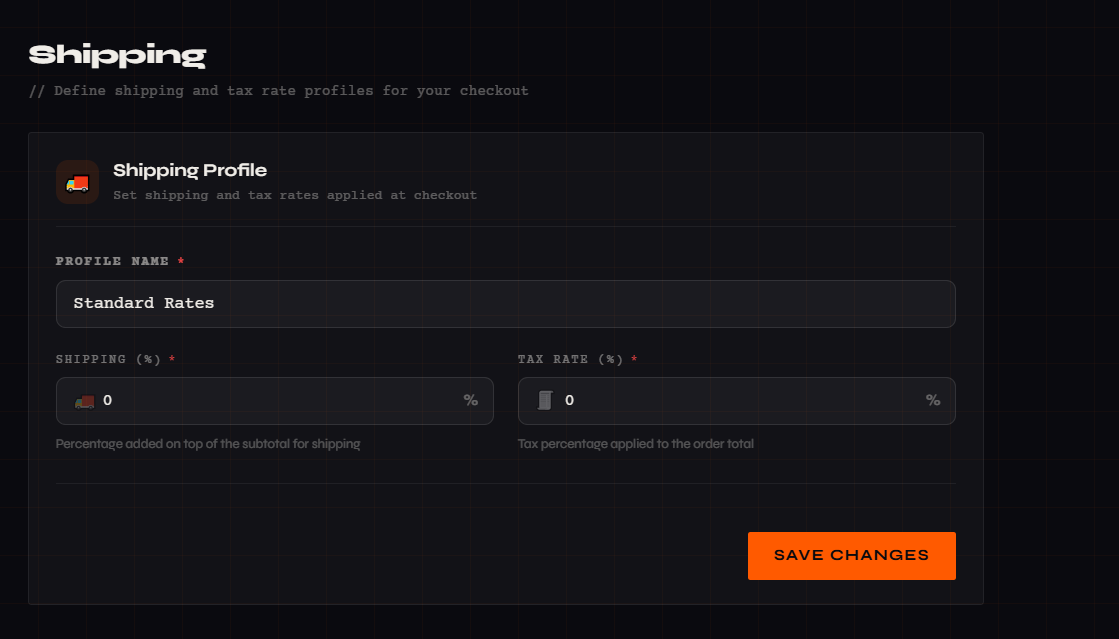
Shipping profiles define how handling fees and taxes are applied to orders. Multiple profiles can be configured for different product lines, regions, or fulfillment methods. Only one profile can be active as the default at any time.
Endpoints
RESPONSE
{
                    "status": true,
                    "data": [
                    {
                    "id": 1,
                    "profileName": "Standard Rates",
                    "handlingFeeValue": 5.50,
                    "taxRate": 8.5,
                    "isDefaultProfile": 1
                    }
                    ]
                    }
| Path Param |
Type |
Description |
| id |
string |
Shipping profile ID |
JSON
{
                    "name": "Standard Rates",
                    "shippingHandling": 5.50,
                    "isActive": 1,
                    "taxRate": 8.5,
                    "isDefaultProfile": 1
                    }
201 Created
Request body is the same structure as the create endpoint.
Field Reference
| Field |
Type |
Description |
| name |
string |
Profile name |
| shippingHandling |
decimal |
Handling fee percentage or fixed amount |
| taxRate |
decimal |
Tax percentage applied to orders |
| isActive |
0/1 |
Whether this profile is active |
| isDefaultProfile |
0/1 |
Set as the default shipping profile |
Processing Fee
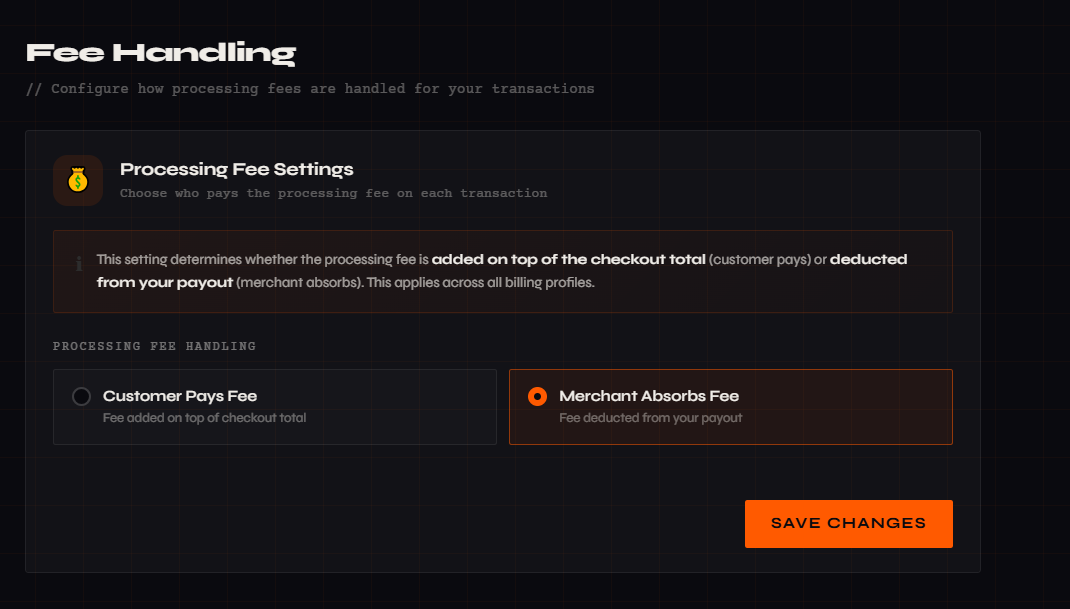
Control who absorbs the payment processing fee — pass it to the customer at checkout or have the merchant absorb it. This setting applies globally to all transactions.
Status: 1
Customer Pays Fee
Status: 0
Merchant Absorbs Fee
Endpoints
RESPONSE
{
                    "data": {
                    "isProcessingFeeEnabled": 1
                    }
                    }
JSON
{
                    "status": 1
                    }
1 = Customer pays the processing fee | 0 = Merchant absorbs the fee
Payment Gateways
Integrate third-party payment processors by storing their credentials securely. PayBito supports multiple gateway integrations including Stripe and other providers. Credentials are encrypted at rest and never exposed in GET responses.
Endpoints
JSON
{
                    "gatewayName": "Stripe",
                    "clientId": "pk_live_xxxxx",
                    "clientSecret": "sk_live_xxxxx"
                    }
201 Created
JSON
{
                    "id": "123",
                    "clientId": "pk_live_new",
                    "clientSecret": "sk_live_new",
                    "isActive": "1"
                    }
RESPONSE
{
                    "payment_gateways": [
                    {
                    "id": "1",
                    "gatewayName": "Stripe",
                    "clientId": "pk_live_xxx",
                    "isActive": "1"
                    }
                    ]
                    }
Security Note: clientSecret is never returned in GET responses. Only clientId and active status are exposed.
Billing Profiles
Billing profiles define which payment methods and currencies are available to customers at checkout. Combine multiple payment method IDs and currency IDs to create flexible checkout experiences — for example, a crypto-only store or a multi-currency fiat checkout.
Endpoints
200 OK – Returns billing profile object
JSON
{
                    "billingType": "SINGLE",
                    "profileName": "Standard Payment Profile",
                    "paymentMethodIds": "1,2,3",
                    "isDefaultProfile": 1,
                    "currencyIds": "1,164,165"
                    }
Request body uses the same structure as the create endpoint.
Payment Method IDs
Currency ID Map
| Currency |
ID |
Currency |
ID |
| USD |
1 |
EUR |
164 |
| BTC |
2 |
SGD |
165 |
| ETH |
3 |
GBP |
1878 |
| USDT |
16 |
AUD |
11178 |
| USDC |
148 |
JPY |
6880 |
| BCH |
4 |
HKD |
28 |
| LTC |
7 |
CHF |
27 |
| XRP |
14 |
DOGE |
124 |
| HCX |
8 |
— |
— |
Cart & Checkout
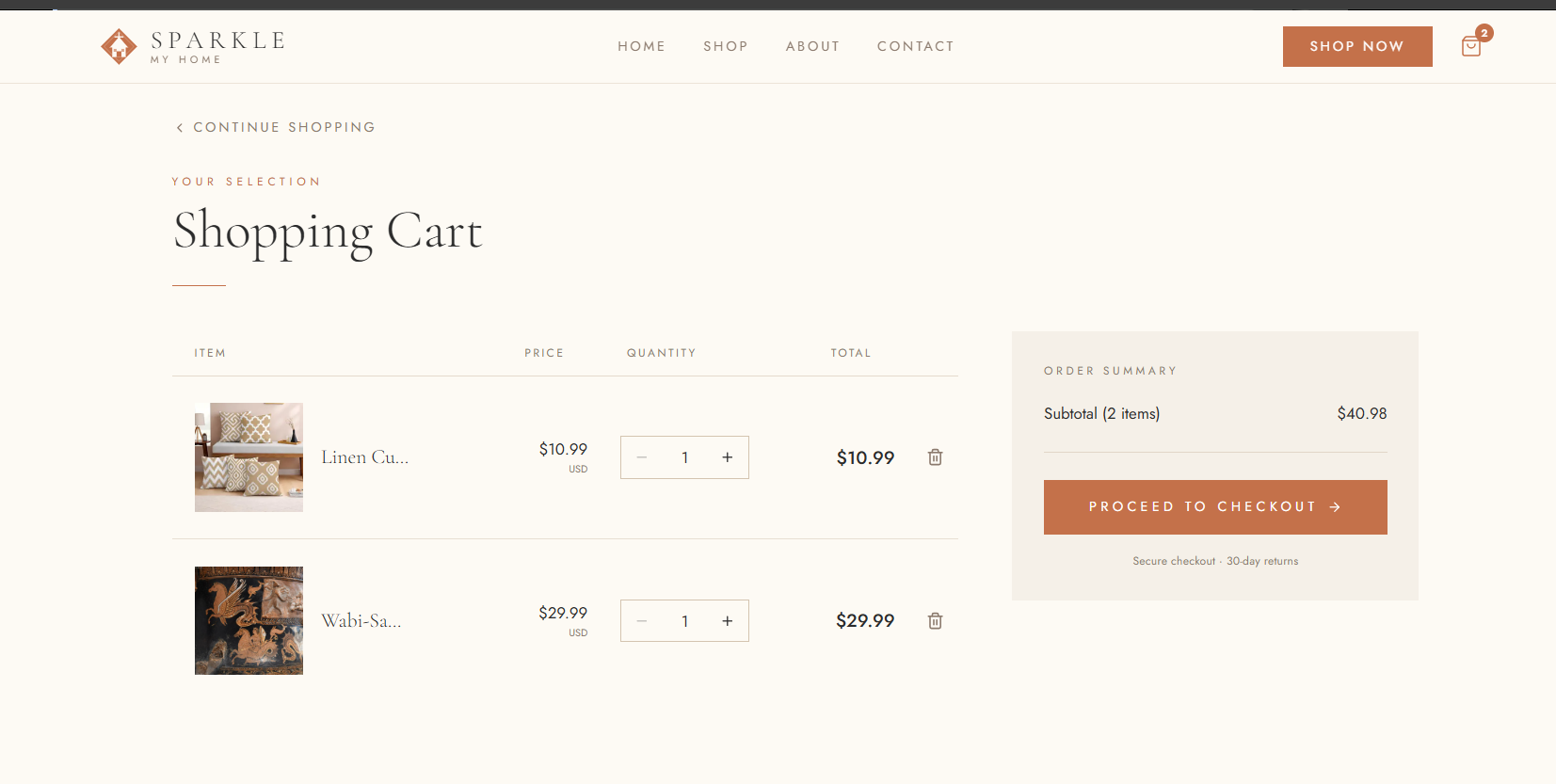
The Cart API manages the full shopping lifecycle from adding items to processing payment. A persistent cart token is stored in localStorage (key: sparkle_cart_token) and passed with every request. The checkout endpoint creates a payment session and redirects the user to the hosted checkout page.
Cart Lifecycle
Endpoints
Include skipAuthFields: true in request headers. If no cartToken is provided, a new one is generated and stored in localStorage.
JSON
{
                    "merchantId": 1001,
                    "cartToken": "optional_existing_token",
                    "catalogId": 123,
                    "products": [
                    {
                    "productId": "PROD_1001_001",
                    "productType": "CART",
                    "name": "Ceramic Vase",
                    "prices": [
                    {
                    "priceId": 5001,
                    "isDefault": true,
                    "priceType": "one-time",
                    "currencies": [
                    { "currency": "USD", "amount": 49.99, "isDefault": true }
                    ],
                    "inventory": { "track": true, "quantity": 1 }
                    }
                    ]
                    }
                    ]
                    }
| Query Param |
Type |
Description |
| merchantId |
string |
Your merchant ID |
| cartToken |
string |
Cart token from localStorage |
Include the updated quantity in addPrices[].inventory.quantity along with the full product context.
200 OK – Returns updated product data
After removal, a cart:change event is dispatched to notify the UI.
200 OK – Deletion confirmed
Request Body
JSON
{
                  "merchantId": 1001,
                  "cartToken": "eyJhbGciOiJIUzI1NiIs...",
                  "catalogId": 12345,
                  "paymentName": "New payment"
                  }
Response
JSON
{
                  "id": "pay_123456789",
                  "brokerId": "broker_001",
                  "data": {
                  "id": "pay_123456789"
                  }
                  }
Checkout Flow: Cart token is cleared → Response data is base64-encoded → User is redirected to /checkout?data={base64_payload}
Checkout Flow:
1. Cart token is cleared
2. Response data is base64-encoded
3. User is redirected to /checkout?data={base64_payload}
Encoded Payload Structure
JSON
{
                  "paymentId": "pay_123456789",
                  "merchantId": "1001",
                  "brokerId": "broker_001"
                  }
Security Note: The checkout endpoint is protected against CSRF attacks. Ensure that the request originates from your domain and includes the correct cart token. Never expose the payment session ID or merchant ID in client-side code outside of the checkout flow.
Data Models
All API responses follow consistent object structures. The models below document every field, its type, and its purpose for quick reference during integration.
Buyer Profile Object
| Field |
Type |
Description |
| profileName |
string |
Display name for this profile |
| collectEmail |
0/1 |
Collect email at checkout |
| collectFullName |
0/1 |
Collect customer full name |
| collectAddress |
0/1 |
Collect shipping address |
| collectPhoneNumber |
0/1 |
Collect phone number |
| collectCompanyName |
0/1 |
Collect company name |
| collectTaxInfo |
0/1 |
Collect tax/VAT information |
| collectOrderNotes |
0/1 |
Allow customer order notes |
| customFields |
array |
Custom field definitions |
Discount Rule Object
| Field |
Type |
Description |
| id |
integer |
Unique rule ID |
| profileName |
string |
Discount profile name |
| minimumCartValue |
decimal |
Cart threshold to activate the discount |
| discountPercentage |
decimal |
Discount percentage (1–100) |
Shipping Profile Object
| Field |
Type |
Description |
| name |
string |
Profile name |
| shippingHandling |
decimal |
Shipping handling fee |
| taxRate |
decimal |
Tax percentage |
| isActive |
0/1 |
Whether profile is active |
| isDefaultProfile |
0/1 |
Set as default profile |
Error Handling
All errors follow a consistent response format. Catch errors by checking the HTTP status code and the status: false flag in the response body.
Error Response Format
JSON
{
              "status": false,
              "message": "Human-readable error description",
              "code": "ERROR_CODE"
              }
HTTP Status Codes
200
OK
Request processed correctly
201
Created
Resource successfully created
400
Bad Request
Validation failed — check request body fields
404
Not Found
The requested resource does not exist
500
Server Error
An unexpected error occurred on the server
Best Practice: Always check both the HTTP status code and the status field in the response body. Some endpoints return 200 with status: false for soft errors.
Quick Start Examples
Get up and running fast with these ready-to-use JavaScript code snippets. Each example demonstrates a common merchant setup task using the API helper functions.
1. Create a Buyer Profile
Collect essentials at checkout
Enable email, address, and phone collection as the default profile.
JavaScript
const response = await apiAddBuyerInformation({
              profileName: "My Store Checkout",
              collectEmail: 1,
              collectAddress: 1,
              collectPhoneNumber: 1,
              isDefaultProfile: 1
              });
2. Set Up Tiered Discounts
Reward larger cart values
Create two discount tiers in a single batch request.
JavaScript
await apiBatchDiscounts({
              merchantId: 1001,
              profileName: "Welcome Offer",
              newDiscounts: [
              { minimumCartValue: 50.00, discountPercentage: 10.00 },
              { minimumCartValue: 100.00, discountPercentage: 15.00 }
              ]
              });
3. Configure Shipping & Tax
Set up your first shipping profile
Create a default profile with express shipping and 8.5% tax rate.
JavaScript
await apiCreateShippingProfile({
              name: "Express Shipping",
              shippingHandling: 10.00,
              taxRate: 8.5,
              isDefaultProfile: 1
              });
4. Enable Crypto Payments
Accept BTC, ETH, and USDT
Configure a billing profile with Brand Wallet and three major crypto currencies.
JavaScript
await apiCreateBillingProfile({
              billingType: "SINGLE",
              profileName: "Crypto Store",
              paymentMethodIds: "3", // Brand Wallet
              currencyIds: "2,3,16" // BTC, ETH, USDT
              });
5. Set Processing Fee (Customer Pays)
JavaScript
await apiSetProcessingFeeStatus(1); // 1 = customer pays
Security Reminders:
- Always use HTTPS in production
- Keep API credentials and client secrets secure
- Test with sample data before going live
- All endpoints expect
application/json content type
Helper Functions
These functions manage the lifecycle of the cart token and sync the UI state across your application.
| Function |
Action |
getCartToken() |
Retrieves token from localStorage |
setCartToken(token) |
Updates persistent storage with new token |
clearCartToken() |
Purges token and catalog session |
emitCartChange() |
Triggers the cart:change event |
Event Listening
Listen for changes globally to refresh your header or cart icons:
window.addEventListener('cart:change', refreshUI)
Data Models
Standardized objects used for Cart Items (UI) and API Payloads.
Cart Item Object (UI Format)
| Field |
Type |
Description |
productId |
string |
Unique ID |
unitAmount |
number |
Price per unit |
quantity |
number |
Current count |
Quick Start Examples
1. Add Product to Cart
Javascript
              import { addToCart } from '../utils/cartApi';


              const product = { id: 1, name: "Ceramic Vase", quantity: 1 };

              const result = await addToCart(product);

              console.log('Cart updated:', result.cartToken);
2. Remove Item
Javascript
              await removeFromCart({

                productId: "PROD_1001",

                priceId: 5001

              });
Frontend: CartPage
The CartPage component handles full cart logic, from quantity adjustments to checkout redirects.
State Management
Handles loading spinners and empty states automatically.
Checkout Flow
Direct integration with hosted payment pages via checkoutCart().
Error Handling
All API errors follow a standard structure for easy debugging.
Common Status Codes
- Cart not found: Reset token and re-initialize.
- Insufficient inventory: Adjust quantity to available stock.
Payments & Crypto Checkout API Documentation
Quick Reference
| Item |
Value |
| Base Service URL |
https://service.hashcashconsultants.com/billbitcoins-v2 |
| IP Geolocation API |
https://api.ipgeolocation.io/ipgeo |
| Checkout Page |
/checkout?data={base64_payload} |
| Content Type |
application/json |
Checkout Flow
1. Load Page with ?data= parameter
2. IP Geolocation (auto-fill country)
3. Fetch Profile Details (/profileDetailsById)
4. Calculate Fees (shipping, tax, processing)
5. User Fills Buyer Information Form
6. Submit → Resolve Customer Identity
7. Create Checkout Session
8. Redirect to /payments/ for Crypto
API Endpoints
1. Get Profile Details
GET /payment/profileDetailsById
Retrieves products, pricing, shipping, and buyer configuration.
| Parameter |
Type |
Req |
Description |
| id |
string |
✅ |
Payment link or catalog ID |
| merchantId |
string |
✅ |
Your unique Merchant ID |
{
                "error": 0,
                "products": [{ "productId": "PROD_001", "name": "Premium Plan" }],
                "buyersProfiles": [{ "collectEmail": 1, "collectFullName": 1 }],
                "isProcessingFeeApplied": "1"
              }
2. Resolve Customer Identity
POST /customeridentity/resolve
Creates or retrieves a customer profile based on contact info.
{
                "email": "customer@example.com",
                "name": "John Doe",
                "shippingAddress": { "city": "New York", "country": "US" }
              }
Data Models
Checkout URL Parameter
The checkout page accepts a ?data= parameter containing a base64-encoded JSON object.
const decoded = JSON.parse(atob(encodedData))
Fee Calculation Structure
| Field |
Description |
| baseAmount |
Subtotal of all products |
| handlingFeeAmount |
Shipping fee (percentage of subtotal) |
| discountTotal |
Applied discount amount |
| grandTotal |
Final total after all calculations |
Frontend Component
Auto-Detection
IP geolocation pre-fills the country field automatically for higher conversion.
Real-time Fees
Instantly updates tax, shipping, and processing fees as the user interacts.
Quick Start Examples
Initialize Checkout Redirect
const checkoutData = {
            ` id: "pay_123456",
              merchantId: "1001"
            };
            const encoded = btoa(JSON.stringify(checkoutData));
            window.location.href = `/checkout?data=${encoded}`;
`
Submit Checkout Form
const submitCheckout = async (formData) => {
              // 1. Resolve Identity
              const identity = await fetch('/customeridentity/resolve', { ... });

              // 2. Create Session
              const session = await fetch('/checkout/createCheckoutSession', { ... });

              // 3. Redirect to Payments
              window.location.href = `/payments/?data=${btoa(JSON.stringify(session.data))}`;
            };
Error Handling
| Scenario |
Message |
Resolution |
| Missing params |
"Missing id or merchantId" |
Check ?data= encoding |
| Profile fail |
"Failed to load profile" |
Check Payment Link ID |
| Identity fail |
"Identity verification failed" |
Verify email format |
Query Parameters
| Parameter |
Type |
Required |
Description |
| id |
string |
Required |
Payment ID or session ID |
| merchantId |
string |
Required |
Your merchant ID |
Example Request
GET /payment/profileDetailsById?id=pay_123456&merchantId=1001
Response
{
                      "error": 0,
                      "products": [...],
                      "billingProfiles": [{
                        "billingProfileId": 201,
                        "profileName": "Premium Plan",
                        "billingMethod": [
                          { "pmId": 1, "name": "Stripe" },
                          { "pmId": 2, "name": "PayPal" },
                          { "pmId": 3, "name": "Brand Wallet" }
                        ],
                        "currencies": [
                          { "currency": "BTC", "currencyId": 2 },
                          { "currency": "ETH", "currencyId": 3 }
                        ]
                      }],
                      "isProcessingFeeApplied": "1",
                      "redirectUrlProfile": [{
                        "successUrl": "https://merchant.com/success",
                        "failureUrl": "https://merchant.com/failure",
                        "isDefault": 1
                      }]
                    }
Request Body
{
                      "merchantId": "1001",
                      "currencyId": "1",
                      "amount": 99.99
                    }
Response
{
                      "error": "0",
                      "transactionFee": 2.99,
                      "totalAmount": 102.98,
                      "txnCharge": 2.99
                    }
Request Body
{
                    "sessionId": "sess_123456",
                    "paymentMethodId": "1",
                    "clientSecret": "random_32_char_secret"
                  }
Payment Method IDs
1
Stripe
Credit / Debit Card
3
Brand Wallet
Exchange Account
4
Ext. Wallet
Web3 / MetaMask
Response
{
                      "status": true,
                      "data": {
                        "paymentIntentId":    "pi_123456",
                        "gatewayIntentId":    "cs_test_xxx",
                        "gatewayPublicKey":   "pk_live_xxx",
                        "gatewayIntentSecret": "seti_xxx",
                        "gatewayUrl":         "https://checkout.stripe.com/xxx"
                      }
                    }
Quick Start — Stripe: Use the gatewayPublicKey to load Stripe.js, then call stripe.confirmPayment() with the gatewayIntentSecret and a return_url.
Request Body
{
                    "paymentIntentId":    "pi_123456",
                    "amount":             "0.00150000",
                    "currency":           "BTC",
                    "marketPrice":        "45000.00",
                    "blockchain":         "ERC",
                    "walletProvider":     "MetaMask",
                    "walletAddress":      "0x742d35Cc6634C0532925a3b844Bc9e7595f0bEb0",
                    "network":            "ERC",
                    "baseAmount":         "0.00120000",
                    "taxAmount":          "0.00010000",
                    "discountAmount":     "0.00005000",
                    "shippingAmount":     "0.00015000",
                    "processingFeeAmount":"0.00005000"
                  }
Response
{
                      "status": true,
                      "data": {
                        "chargeId":        "ch_123456",
                        "receivingAddress": "0xMerchantWalletAddress"
                      }
                    }
ERC-20 ABI (Minimal): Use ["function transfer(address to, uint256 value) returns (bool)"] to execute ERC-20 token transfers on-chain using the receivingAddress.
Request Body
{
                      "email":         "customer@example.com",
                      "phone":         "+1234567890",
                      "name":          "John Doe",
                      "walletAddress": "",
                      "deviceId":      "dev_1a2b3c4d",
                      "sessionId":     "sess_abc123",
                      "PAYMENT_LINK":  "pay_123456",
                      "merchantId":    1001
                    }
Device ID Generation
const getDeviceId = () => {
                      const KEY = 'checkout_device_id'
                      const stored = localStorage.getItem(KEY)
                      if (stored) return stored
                      const signals = [
                        navigator.platform, navigator.hardwareConcurrency,
                        window.screen.width, window.screen.height,
                        new Date().getTimezoneOffset()
                      ]
                      let hash = 5381
                      for (const signal of signals) {
                        const str = String(signal)
                        for (let i = 0; i < str.length; i++) {
                          hash = ((hash << 5) + hash) ^ str.charCodeAt(i)
                        }
                      }
                      const id = "dev_" + (hash >>> 0).toString(16)
                      localStorage.setItem(KEY, id)
                      return id
                    }
Login Flow
1
Check MFA Status
Verify whether the user's account requires multi-factor authentication before proceeding.
2
Send OTP
Request an email OTP to the user's registered address via POST /user/SendOtp/login.
3
Login with OTP
Submit credentials plus the OTP to receive an authorization token for subsequent requests.
{
                        "email":             "user@example.com",
                        "password":          "user_password",
                        "gRecaptchaResponse": "captcha_token",
                        "sessionId":         "session_123",
                        "brokerId":          "broker_001"
                      }
{
                          "email": "user@example.com"
                        }
{
                        "email":      "user@example.com",
                        "password":   "user_password",
                        "otp":        "12345678",
                        "brokerId":   "broker_001",
                        "deviceId":   "device_123",
                        "deviceType": "Desktop browser",
                        "browser":    "Chrome",
                        "latitude":   "40.7128",
                        "longitude":  "-74.0060",
                        "ipAddress":  "192.168.1.1",
                        "location":   "United States"
                      }
{
                      "brokerId":          "broker_001",
                      "email":             "user@example.com",
                      "password":          "StrongP@ss123",
                      "firstName":         "John",
                      "lastName":          "Doe",
                      "phone":             "1234567890",
                      "countryCode":       "1",
                      "country":           "United States",
                      "gRecaptchaResponse": "captcha_token",
                      "sessionId":         "session_123"
                    }
Authentication Required: All endpoints in this section require the header authorization: BEARER {token} obtained from the login flow.
{
                      "customerId": "12345",
                      "uuid":       "user_uuid_123"
                    }
{
                      "uuid":               "user_uuid_123",
                      "userId":             "12345",
                      "intentId":           "pi_123456",
                      "currency":           "BTC",
                      "sendAmount":         0.0015,
                      "marketPrice":        45000.00,
                      "baseAmount":         67.50,
                      "shippingAmount":     5.00,
                      "taxAmount":          6.50,
                      "processingFeeAmount": 2.00,
                      "discountAmount":     10.00
                    }
{
                      "uuid":       "user_uuid_123",
                      "currencyId": 2,
                      "marginType": "1",
                      "tokenType":  "erc"
                    }
USDT supports ERC and TRC networks. USDC is available on ERC only. All other currencies use their native networks.
Smart Contract Addresses
| Contract |
Network |
Address |
| ETH Merchant |
ERC-20 |
0xc29c1E36be93bA472AfdAfDEEB2f4Dc306577528 |
| USDT |
ERC-20 |
0xdAC17F958D2ee523a2206206994597C13D831ec7 |
| USDC |
ERC-20 |
0xA0b86991c6218b36c1d19D4a2e9Eb0cE3606eB48 |
| TRON Merchant |
TRC-20 |
TWanaFPf5PwnpvEVn29BPtPk14kjNBS7q4 |
| USDT |
TRC-20 |
TR7NHqjeKQxGTCi8q8ZY4pL8otSzgjLj6t |
Chain ID0x1
RPC URLhttps://rpc.ankr.com/eth
Explorerhttps://etherscan.io/tx/
Chain ID0xaa36a7
RPC URLhttps://sepolia.infura.io/v3/...
Explorerhttps://sepolia.etherscan.io/tx/
Testnet Development: Use Sepolia for all development and testing. Switch to Ethereum Mainnet (Chain ID 0x1) only for production deployments.
Wallet Connection (EIP-6963)
const wallets = []
window.addEventListener('eip6963:announceProvider', (e) => {
wallets.push(e.detail)
})
window.dispatchEvent(new Event('eip6963:requestProvider'))
const accounts = await walletProvider.request({
method: 'eth_requestAccounts'
})
| Method |
Speed |
Account Required |
Fees |
Best For |
| Stripe |
Instant |
No |
2.9% + $0.30 |
Card payments |
| PayPal |
Instant |
Optional |
Varies |
PayPal users |
| Brand Wallet |
Instant |
Yes (Exchange) |
Low |
Exchange users |
| External Wallet |
5–30 min |
No (Web3) |
Network fee |
Crypto holders |
| Guest Checkout |
5–30 min |
No |
Network fee |
One-time crypto |
Guest Checkout — QR Code Example
const intent = await createPaymentIntent(5)
const charge = await createCharge({
paymentIntentId: intent.paymentIntentId,
amount: cryptoAmount,
currency: selectedCrypto
})
<QRCodeSVG value={charge.receivingAddress} size={200} />
Connection URL
wss://api.paybito.com:9443/TransactionApi/ws/balance/websocket
Subscribe to Balance Updates
client.subscribe(`/topic/balance/${uuid}`, (message) => {
const data = JSON.parse(message.body)
updateBalanceUI(data.currency, data.balance)
})
The WebSocket connection is required for real-time balance updates during Brand Wallet checkout. Subscribe using the authenticated user's uuid to receive only their balance changes.
Error Response Format
{
                  "error": {
                    "error_data": 1,
                    "error_msg": "Human-readable error message"
                  }
                }
Common Error Codes
| Code |
Description |
Resolution |
| 4001 |
User rejected transaction |
Prompt the user to approve in their wallet |
| 4902 |
Network not added to wallet |
Auto-add the network using wallet_addEthereumChain |
| INSUFFICIENT_FUNDS |
Wallet balance too low |
Prompt user to top up wallet before retrying |
| OTP_EXPIRED |
One-time password has expired |
Request a new OTP via /user/SendOtp/login |
Security Reminder: Never expose API secrets or private keys in frontend code. Crypto amounts shown at checkout are indicative — the final amount is calculated at payment time based on live market prices.
Support
Documentation Version 1.0 — Last updated April 15, 2026. Use Sepolia testnet for all development. Switch to mainnet for production only.