Why Do Payment Gateway Transactions Fail? Common Declines, Errors, and Failed Payments
- August 17, 2026
- Soham Guchait
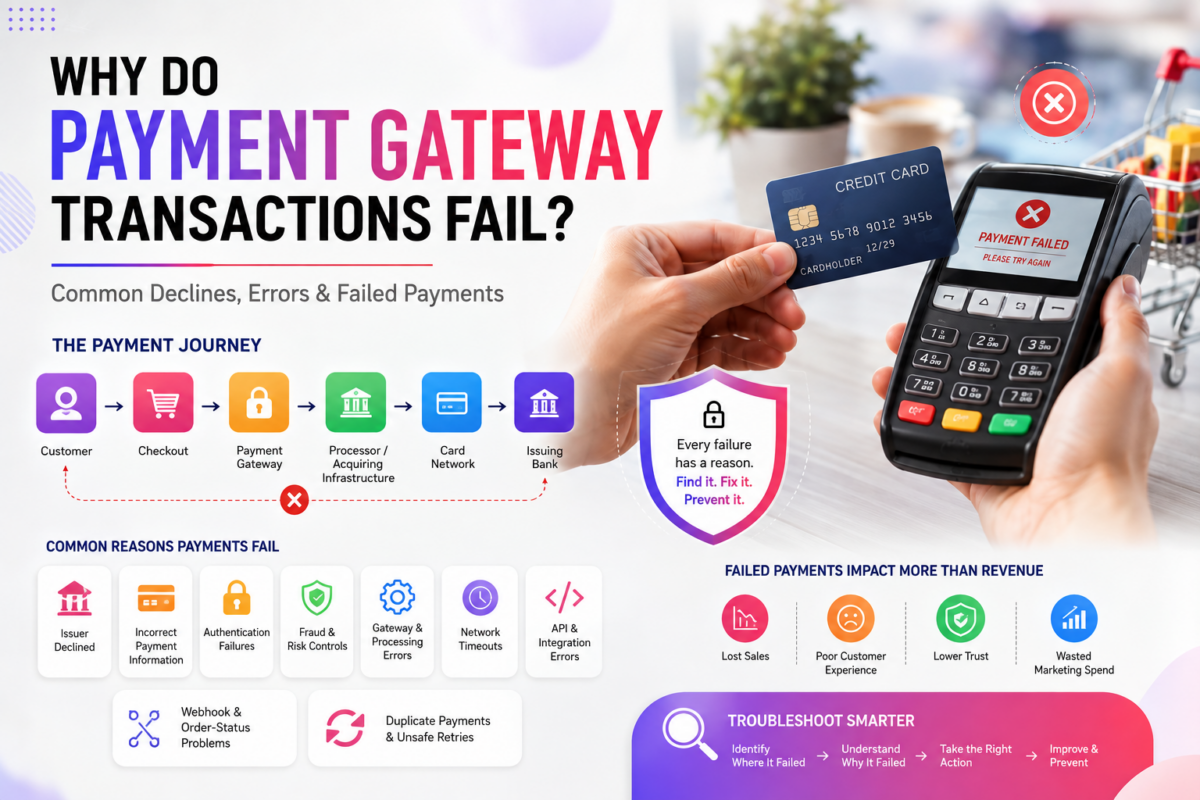
A customer clicks “Pay,” waits for the result, and sees “Payment failed”. To the customer, the problem may look straightforward. Behind that message, however, a payment could have failed because of the card issuer, incorrect payment information, authentication, fraud controls, a technical error, or the merchant’s own integration.
That distinction matters because a failed payment is not necessarily a failed payment gateway. An online payment usually involves several systems working together:
Customer → Checkout → Payment Gateway → Payment Processor/Acquiring Infrastructure → Card Network → Issuing Bank
A failure can occur at any point in that journey. The first step in troubleshooting is therefore to determine where the payment failed and what caused the failure.
Where Can a Payment Fail?
A payment gateway sits within a larger payment ecosystem. It receives or facilitates the payment request, communicates with other payment systems, and returns information about the transaction to the merchant’s application. Understanding how a payment gateway works helps clarify what happens at each stage of this process.
The customer’s issuing bank may ultimately approve or decline the transaction, while the merchant’s application can also introduce problems before or after the payment reaches the banking infrastructure.
For example, imagine a customer attempting to purchase a $700 laptop. The gateway may receive the payment correctly, but the issuing bank could decline it because the customer’s available funds are insufficient.
In another case, the customer’s card could be perfectly valid, but the merchant’s application might send an unsupported currency or invalid transaction parameter. Both transactions produce a failed payment, but the causes are completely different.
Common Reasons Payment Gateway Transactions Fail
Issuer Declined
One of the most common reasons for an unsuccessful card payment is a refusal by the customer’s issuing bank. The issuer may decline a transaction because of insufficient funds, an expired or blocked card, suspected fraud, transaction restrictions, or other conditions associated with the account.
For example, a customer tries to purchase a $900 television, but the card has insufficient available credit. The payment can travel correctly through the gateway and processing infrastructure, yet the issuer can still refuse the authorization.
The merchant generally cannot override an issuer’s decision. Instead, it can explain that the payment was unsuccessful and allow the customer to try another payment method.
Incorrect Payment Information
Some payments fail because the information supplied during checkout is incorrect.
A customer may enter the wrong card number, expiration date, security code, or other required information. Depending on the payment flow, the request may be rejected before reaching the issuer. This is different from an issuer decline. If the expiration date is incorrect, repeatedly submitting the same information will not solve the problem.
Clear checkout validation can prevent some basic input errors before a transaction is submitted.
Authentication Failures
Some online payments require additional customer authentication.
A customer might be asked to complete a verification step before the transaction can proceed. If that authentication fails, is abandoned, or encounters a technical problem, the payment may not reach normal authorization.
This creates another important distinction: Authentication failure is not necessarily the same as card decline. For a merchant troubleshooting unsuccessful transactions, identifying whether authentication was completed can help narrow down where the problem occurred.
Fraud and Risk Controls
Payment systems may also reject transactions because they appear suspicious.
Risk controls can consider factors such as transaction patterns, customer behavior, location, payment information, or other signals. Depending on the payment architecture, controls can exist at different points in the payment ecosystem.
Consider a customer who suddenly attempts several unusually large purchases. The card may have sufficient funds, but a risk system could still stop the transaction. Therefore, a decline does not automatically mean the customer entered incorrect information or lacked funds.
Gateway and Processing Errors
A payment can fail because of a technical problem within the gateway or another part of the processing infrastructure. It could involve incorrect configuration, invalid transaction parameters, an unavailable downstream service, or communication problems between systems.
For example, a merchant may configure its application to send transactions in a currency that is not supported for its particular payment setup. The request could fail before the customer’s bank ever makes an authorization decision. This is why the error information returned by the payment system is important. A technical error requires a very different response from an issuer decline.
Network Timeouts
A particularly difficult situation occurs when the merchant’s application does not receive a response.
Suppose a customer submits a $500 payment. The request reaches the payment infrastructure, but the connection times out before the merchant’s application receives the result. The application now faces an important question:
Did the payment fail, or did the response fail to arrive?
Those are not the same thing.
Immediately sending another payment request could potentially create a duplicate transaction if the first payment actually succeeded. A robust integration should therefore be able to check transaction status and safely handle uncertain responses.
API and Integration Errors
The merchant’s own software can also cause payment failures.
Common examples include incorrect credentials, invalid parameters, unsupported currencies, incorrect API endpoints, missing required information, or an invalid transaction state.
Imagine an ecommerce business changes its production configuration but accidentally sends requests to the wrong environment. Customers could suddenly experience payment failures even though the gateway itself is operating normally.
A useful clue is the pattern of failures. If payments across many cards and customers suddenly stop working at the same time, the merchant should investigate its integration and configuration rather than assuming every customer has a payment problem. For businesses using APIs, transaction IDs, request IDs, application logs, and gateway response codes can help identify where the problem originated.
Webhook and Order-Status Problems
Sometimes the payment itself succeeds, but the merchant’s system does not correctly record the result.
For example, a customer completes a $200 payment and then loses their internet connection before the website displays the confirmation page. The payment may have succeeded even though the merchant’s order still shows “pending”. This is why payment integrations often use server-to-server notifications such as webhooks.
A webhook can inform the merchant’s application about a transaction event, allowing the application to update the corresponding order. If webhook handling is incorrectly configured, a successful payment can therefore appear to be a failed or incomplete order from the merchant’s perspective.
Duplicate Payments and Unsafe Retries
Retries are useful when temporary technical problems occur, but payment requests should not simply be repeated without checking what happened to the original transaction.
Suppose an application sends a $300 payment request and receives no response. It immediately sends another request.
If the first transaction actually succeeded, the customer could potentially be charged twice. This is why payment integrations use techniques such as transaction-status checks and, where supported, idempotency keys. Idempotency allows a system to recognize that repeated requests represent the same intended operation. The basic rule is:
No response does not necessarily mean no payment.
How to Troubleshoot a Failed Payment?
When a payment fails, start by locating the failure rather than immediately trying the transaction again.
A practical troubleshooting process is:
- Check whether the merchant application actually sent the request.
- Check whether the gateway received and recorded it.
- Identify whether the result was a technical error, refusal, or authentication issue.
- Determine whether the transaction reached authorization.
- If no response was received, verify the transaction’s status before retrying.
This approach separates customer-related failures from technical and integration failures.
For example, if one customer’s card is declined while hundreds of other transactions succeed, an issuer or payment-specific issue may be more likely.
If every payment suddenly begins returning an API authentication error, the merchant’s configuration deserves immediate attention. If payments succeed but orders remain stuck in “pending,” the integration’s webhook or order-update logic may be the problem.
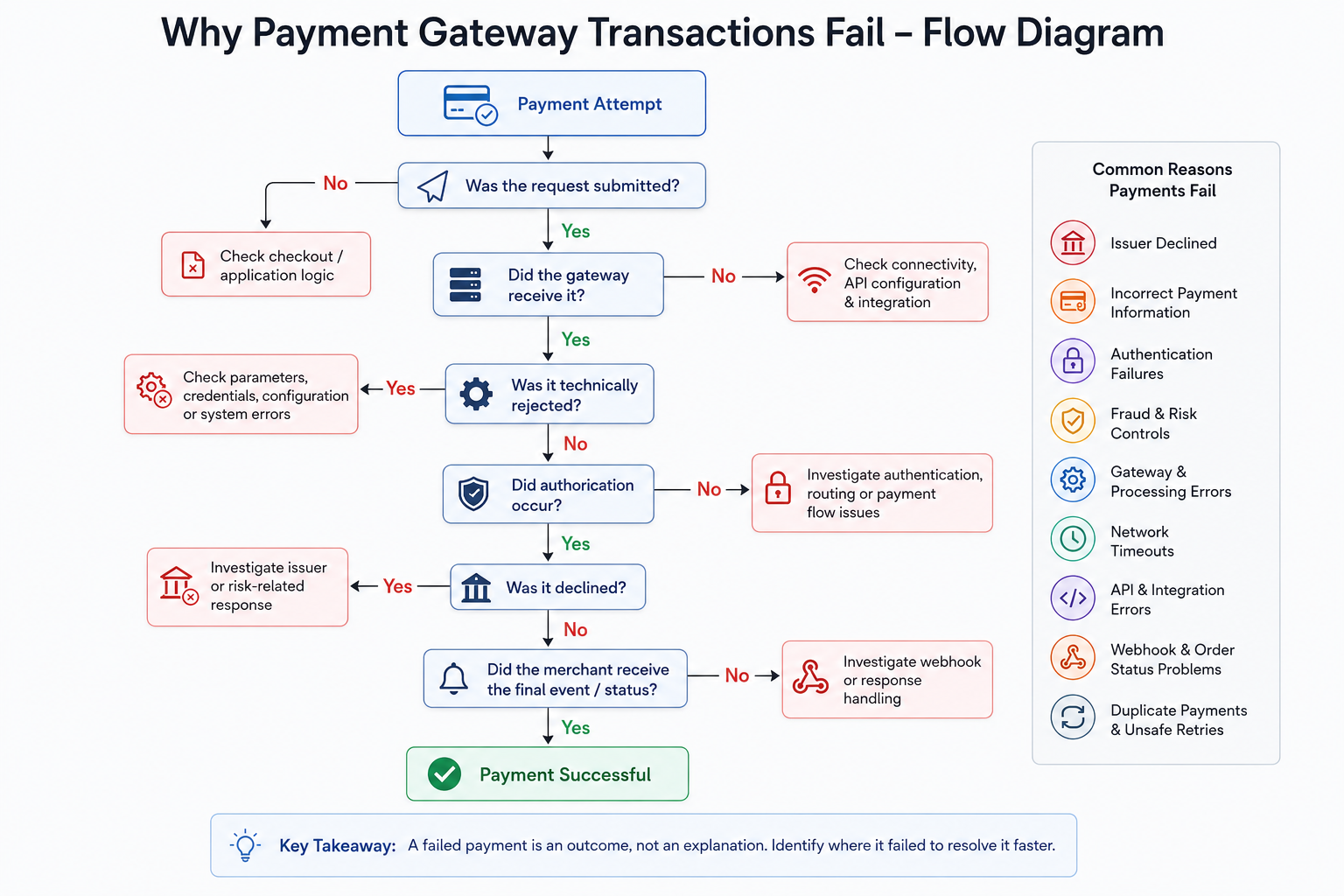
A Payment Failure Decision Tree
The following simplified model can help visualize the troubleshooting process:
Payment Attempt
↓
Was the request submitted?
No → Check checkout/application logic
Yes →
Did the gateway receive it?
No → Check connectivity, API configuration, and integration
Yes →
Was it technically rejected?
Yes → Check parameters, credentials, configuration, or system errors
No →
Did authorization occur?
No → Investigate authentication, routing, or payment-flow issues
Yes →
Was it declined?
Yes → Investigate issuer or risk-related response
No →
Did the merchant receive the final event/status?
No → Investigate webhook or response handling
This is more useful than treating every failed payment as the same type of problem.
Why the Location of the Failure Matters?
A payment failure is an outcome, not an explanation. An issuer decline requires a different response from an invalid API request. A timeout requires different handling from an expired card. A webhook problem requires a different investigation from a fraud-related refusal. The most effective troubleshooting approach is therefore to ask three questions:
- Where did the payment fail?
- Why did it fail?
- What should the application do next?
Once businesses start viewing payment failures through those three questions, troubleshooting becomes much more systematic.
The goal is not simply to eliminate every failed transaction – some declines are legitimate and unavoidable. The goal is to distinguish customer payment problems, payment-system problems, and merchant integration problems, then respond appropriately to each one.
That understanding becomes particularly important when building or maintaining a payment integration, because reliable payment processing depends not only on successful transactions but also on handling failures, retries, status changes, and unexpected events correctly.

Categories
- ACH Payments (10)
- adult payment processing (11)
- AI (9)
- Altcoins (10)
- Banking (10)
- Bitcoin (133)
- Bitcoin ETF (11)
- Bitcoin Price (30)
- Blockchain (50)
- Brokering World Hunger Away (16)
- Business (17)
- card payment processing (10)
- CBD (11)
- CBDC (11)
- Chargeback (8)
- coaching business (11)
- COVID-19 (3)
- Crypto ATMs (1)
- Crypto Banking (17)
- Crypto Bill (1)
- Crypto business owner platform (31)
- Crypto Investment (3)
- Crypto Markets (5)
- Crypto Payment (35)
- Crypto Payment Processor (4)
- Crypto Prices (1)
- Crypto Trading (92)
- Cryptocurrency (402)
- Cryptocurrency Exchange (108)
- Data Visualization (2)
- dating platforms (11)
- debt collection payment processing (10)
- Decentralized Finance (7)
- DeFi Payment (9)
- DEX (3)
- Digital Currency (23)
- dropshipping payment processing (12)
- Ethereum (2)
- FAQ (7)
- file sharing payment processing (11)
- Finance (25)
- Financial Equality (4)
- Financial Freedom (8)
- Forex (35)
- hemp (1)
- ICO (2)
- Investment (11)
- IPTV (11)
- Merchant Account (10)
- Mining (3)
- News (66)
- NFTs (2)
- online gambling (11)
- P2P (1)
- Paybito (147)
- PayBitoPro (693)
- PayBitoPro Coin Listing (6)
- PayBitoPro Exchange (2)
- Payment Gateway (48)
- peptide (10)
- Post COVID Digital Transformation (1)
- Press Release (130)
- Privacy & Security (3)
- Real Estate (1)
- Stablecoin (5)
- Technology (15)
- Travel (11)
- Uncategorized (10)
- US Presidential Election (2)
- Utility Coin (1)
- Web3 business (4)
- Web3 Wallets (2)
- White Label Crypto Exchange (8)
Recent Posts
- Payment Gateway vs. Payment Orchestration: What’s the Difference?
- What Is Smart Payment Routing? Strategies to Optimize Payment Performance
- How to Improve Payment Approval Rates for High-Risk Businesses?
- Why Are Online Payments Failing? Common Causes and How to Fix Them
- How to Use Multiple Payment Processors to Reduce Business Disruptions?