How Does a Payment Gateway Work? From Checkout to Payment Confirmation
- August 17, 2026
- Soham Guchait
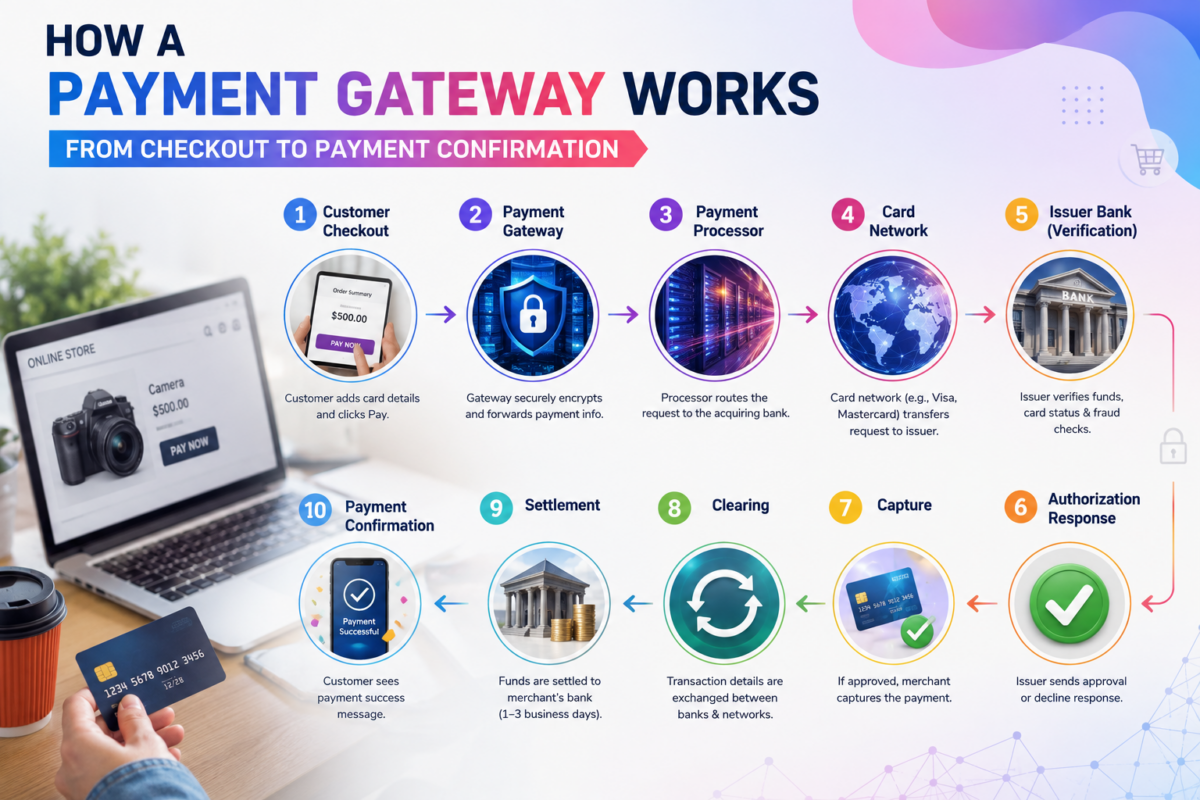
A customer can click Pay and see a successful-payment message in seconds. Behind that simple interaction, however, a payment request may pass through several systems before the transaction is authorized and the merchant eventually receives the funds.
Understanding how a payment gateway works means looking beyond the checkout screen. The gateway is one part of a larger payment flow connecting the merchant’s website or application with payment-processing infrastructure, financial institutions, and card networks.
Consider a customer purchasing a $500 camera from an online store. What happens after the customer submits the payment?
The Payment Gateway Transaction Flow
At a high level, a card payment can move through a sequence like this:
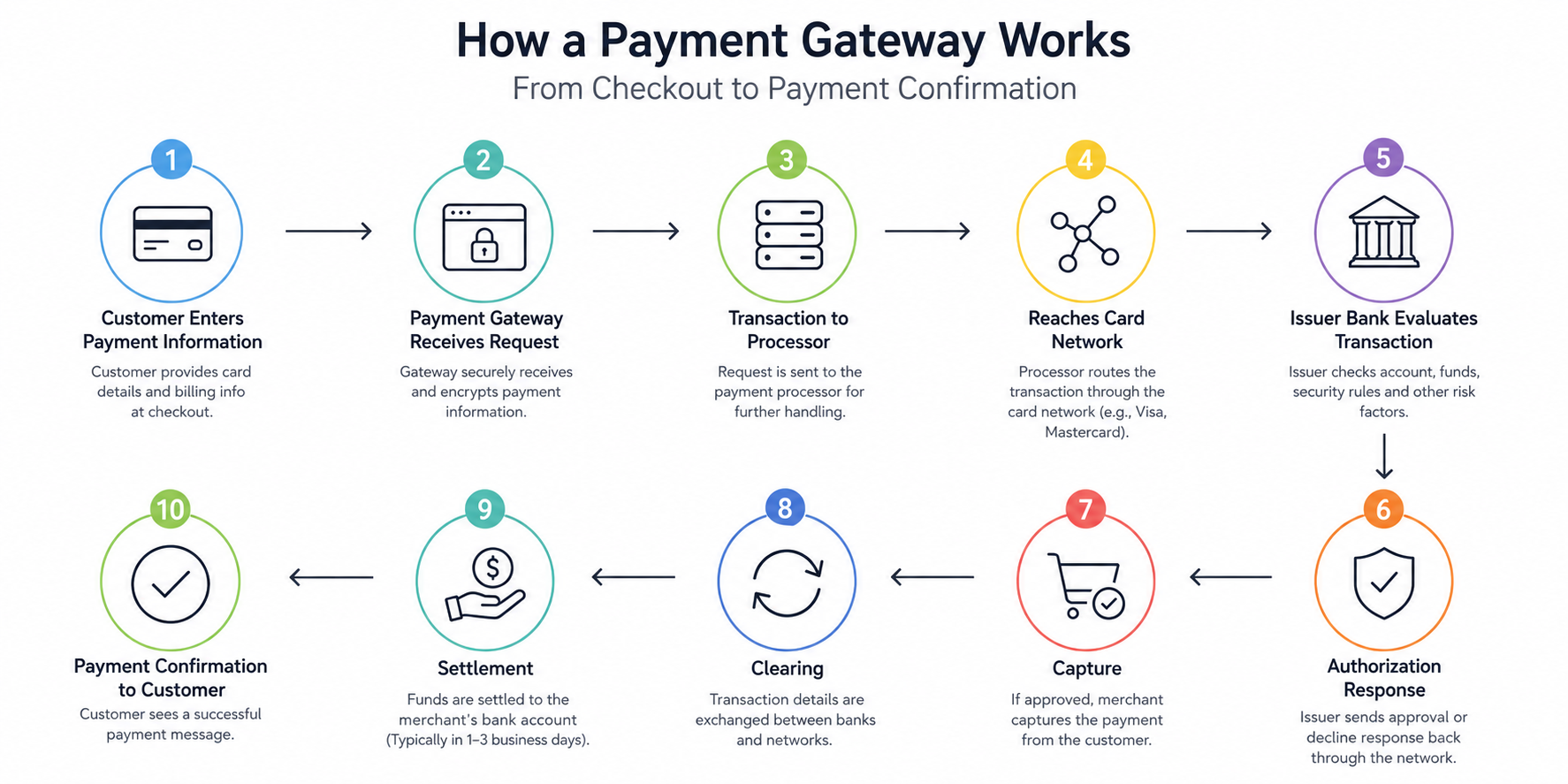
Customer → Checkout → Payment Gateway → Payment Processor → Acquiring Side → Card Network → Issuing Bank → Authorization Response → Capture → Clearing → Settlement
The exact architecture can differ depending on the payment method, provider, country, and merchant setup. Some providers combine several functions, so the merchant may not see each participant separately. The important point is that clicking “Pay” is only the beginning of the transaction.
Step 1: The Customer Enters Payment Information
The process begins when the customer selects a payment method and provides the information required to make the purchase. For a card transaction, this may include the card number, expiration date, security code, and billing information.
The payment information may be collected through a hosted payment page, embedded payment fields, or another checkout implementation. The customer’s experience can therefore look very different from one website to another even when the underlying payment process performs similar functions.
Once the customer submits the transaction, the merchant’s checkout needs to communicate that payment request to the payment infrastructure. That is where the gateway becomes involved.
Step 2: The Payment Gateway Receives the Payment Request
The payment gateway acts as a technology layer between the merchant’s payment experience and the downstream processing environment.
The checkout sends the transaction information into the gateway flow. Depending on the implementation, the gateway may handle payment credentials directly, work with tokenized information, or interact with securely hosted payment components. The gateway also receives information about the transaction itself, such as the amount and merchant-related details.
For our $500 camera purchase, the gateway needs to know that the merchant is requesting authorization for a $500 transaction. The gateway is not deciding whether the customer’s bank should approve that purchase. Its role is to facilitate the transaction’s movement into the appropriate processing flow. This distinction is important because a gateway and a processor can perform different functions even though they may be offered together.
Step 3: The Transaction Moves to the Processing Infrastructure
After the payment request enters the gateway flow, it moves into the relevant payment-processing infrastructure. The processor helps communicate the transaction with the appropriate acquiring and payment-network infrastructure.
The exact architecture varies. A merchant might use separate gateway and processing providers, or a single provider may supply multiple components. This is one reason payment diagrams found online do not always look identical. Payment infrastructure is not necessarily a single standardized chain where every transaction passes through visibly separate companies.
What matters is the function being performed: The payment request must reach the systems capable of obtaining an authorization decision.
Step 4: The Transaction Reaches the Card Network
For a typical card payment, the transaction is routed through the relevant card network. Networks such as Visa and Mastercard provide infrastructure that connects participants in the card-payment ecosystem. The network identifies where the authorization request needs to go and facilitates communication between the acquiring side and the card issuer.
At this point, the transaction is still an authorization request. The merchant has not simply received the customer’s $500 because the customer clicked the payment button. The system is asking the issuer whether the transaction can be authorized.
Step 5: The Issuing Bank Evaluates the Transaction
The card issuer is the financial institution that issued the customer’s card. It evaluates the authorization request using information available to it and applicable authorization and risk controls.
For example, the issuer may consider whether the account is valid, whether sufficient funds or available credit exist, whether the card is usable for the transaction, and whether security controls identify a potential problem.
The issuer then produces a response. The result could be an approval or a decline, among other possible outcomes requiring additional handling. If the issuer approves the $500 purchase, that authorization response travels back through the payment infrastructure.
Step 6: The Authorization Response Returns to the Merchant
The response moves back through the relevant systems until the merchant’s checkout or application receives the result. If the transaction is approved, the customer may see:
Payment successful
If it is declined, the checkout may instead display a message asking the customer to use another payment method. This entire authorization exchange can happen within seconds, which is why online payments can feel instantaneous even though multiple systems may be involved.
However, authorization does not necessarily mean the merchant has already received the money. That distinction leads to the next stages.
Authorization vs. Capture
Authorization and capture are related but different events. Let’s see what they mean:
Authorization means the issuer has approved the transaction request and generally places the transaction into an authorized state according to the applicable payment rules.
Capture is the instruction to actually submit the authorized transaction for processing toward settlement. The timing depends on the merchant’s business model.
An ecommerce store selling an immediately available product might capture the payment soon after authorization.
A hotel, rental business, or other business model may authorize an amount first and capture it later, depending on its transaction structure and applicable rules.
Example
Imagine the camera store authorizes the customer’s $500 transaction when the order is placed. The store then confirms that the product is available and captures the transaction. The payment has now progressed beyond the initial authorization stage.
This distinction becomes especially important when discussing refunds, delayed fulfillment, partial captures, or failed transactions.
Step 7: Clearing and Settlement Take Place
After capture, the transaction moves through subsequent payment-processing stages.
Clearing involves the exchange and reconciliation of transaction information among the relevant participants.
Settlement is the stage in which the financial obligations resulting from transactions are settled between the relevant institutions, ultimately supporting the movement of funds to the merchant according to the applicable arrangement.
The merchant therefore should not think of the payment journey as:
Customer clicks Pay → Merchant immediately receives $500
A more accurate model is:
Payment request → Authorization → Capture → Clearing → Settlement
The timing and exact mechanics can vary by payment method, provider, transaction type, and financial arrangement.
What Happens If the Payment Is Declined?
The same flow also explains why a customer can receive a failed-payment message.
Suppose the customer’s issuer declines the $500 transaction because the account does not have sufficient available funds. The issuer sends a decline response back through the payment infrastructure. The gateway ultimately communicates the result to the merchant’s checkout or application. The merchant might then display:
“Your payment could not be completed. Please try another payment method.”
Importantly, the gateway did not necessarily “cause” the decline. The failure occurred because the issuer rejected the authorization request.
Other failures can occur at different points in the transaction, including gateway errors, processor issues, network problems, authentication failures, configuration problems, or technical timeouts.
A Complete Example: A $500 Online Purchase
Let’s put the entire process together.
A customer buys a $500 camera.
- Checkout: The customer enters their card details and submits the order.
- Gateway: The payment gateway securely receives the payment request and passes it into the relevant processing flow.
- Processing: The transaction moves through the applicable processor and acquiring infrastructure.
- Card network: The transaction is routed through the relevant card network.
- Issuer: The customer’s issuing bank evaluates the authorization request.
- Authorization: The issuer approves the $500 transaction.
- Response: The approval travels back to the merchant’s checkout.
- Capture: The merchant captures the authorized transaction.
- Clearing: Transaction information is exchanged and reconciled through the applicable payment systems.
- Settlement: Funds are settled through the relevant financial institutions and become available to the merchant according to its settlement arrangement.
From the customer’s perspective, this may feel like one action. From the payment infrastructure’s perspective, it is a sequence of coordinated events.
Why Does the Payment Gateway Matters in This Process?
The gateway is important because the merchant’s website or application needs a reliable way to communicate payment requests with the infrastructure responsible for processing them. Without that connection, a checkout could collect information but would not have a practical mechanism for submitting the transaction into the relevant payment flow and receiving its result.
The gateway also sits within a broader technical environment involving security controls, authentication, APIs, payment credentials, transaction states, and event notifications. The specific implementation determines how much of that infrastructure is visible to the merchant’s application.
For businesses integrating payment functionality, this is why understanding the payment gateway integration process is useful before selecting a technical approach.
The Key Takeaway
A payment gateway does not simply “take the customer’s money“. It helps move a payment request from the merchant’s checkout into the payment-processing ecosystem and returns the resulting transaction information to the merchant. The broader journey can be summarized as:
Checkout → Gateway → Processing → Authorization → Response → Capture → Clearing → Settlement
Each stage has a different purpose. Once this flow is understood, other payment concepts become easier to distinguish. The next logical questions are how different gateway implementation models work, how businesses integrate them into software, and how the gateway’s API communicates with an application.
Categories
- ACH Payments (10)
- adult payment processing (11)
- AI (9)
- Altcoins (10)
- Banking (10)
- Bitcoin (133)
- Bitcoin ETF (11)
- Bitcoin Price (30)
- Blockchain (50)
- Brokering World Hunger Away (16)
- Business (17)
- card payment processing (10)
- CBD (11)
- CBDC (11)
- Chargeback (8)
- coaching business (11)
- COVID-19 (3)
- Crypto ATMs (1)
- Crypto Banking (17)
- Crypto Bill (1)
- Crypto business owner platform (31)
- Crypto Investment (3)
- Crypto Markets (5)
- Crypto Payment (35)
- Crypto Payment Processor (4)
- Crypto Prices (1)
- Crypto Trading (92)
- Cryptocurrency (402)
- Cryptocurrency Exchange (108)
- Data Visualization (2)
- dating platforms (11)
- debt collection payment processing (10)
- Decentralized Finance (7)
- DeFi Payment (9)
- DEX (3)
- Digital Currency (23)
- dropshipping payment processing (12)
- Ethereum (2)
- FAQ (7)
- file sharing payment processing (11)
- Finance (25)
- Financial Equality (4)
- Financial Freedom (8)
- Forex (35)
- hemp (1)
- ICO (2)
- Investment (11)
- IPTV (11)
- Merchant Account (10)
- Mining (3)
- News (66)
- NFTs (2)
- online gambling (11)
- P2P (1)
- Paybito (147)
- PayBitoPro (693)
- PayBitoPro Coin Listing (6)
- PayBitoPro Exchange (2)
- Payment Gateway (48)
- peptide (10)
- Post COVID Digital Transformation (1)
- Press Release (130)
- Privacy & Security (3)
- Real Estate (1)
- Stablecoin (5)
- Technology (15)
- Travel (11)
- Uncategorized (10)
- US Presidential Election (2)
- Utility Coin (1)
- Web3 business (4)
- Web3 Wallets (2)
- White Label Crypto Exchange (8)
Recent Posts
- Payment Gateway vs. Payment Orchestration: What’s the Difference?
- What Is Smart Payment Routing? Strategies to Optimize Payment Performance
- How to Improve Payment Approval Rates for High-Risk Businesses?
- Why Are Online Payments Failing? Common Causes and How to Fix Them
- How to Use Multiple Payment Processors to Reduce Business Disruptions?